
Momentum
Helping couples turn yearly goals into shared progress
Momentum is a mobile goal-tracking app designed for couples and friends who want to plan, track and complete their yearly goals together.
The idea came from a real frustration: my partner and I set goals every year, but they usually ended up written on paper and left at home. I wanted to create a more motivating way to keep those goals visible, track progress throughout the year and work toward them together.

01
The challenge
Yearly goals often start with good intentions but quickly become difficult to maintain.
Paper lists are easy to forget about, while traditional to-do apps tend to focus on individual tasks rather than shared ambitions. They can also feel repetitive and lack the sense of momentum needed to keep users motivated across an entire year.
The challenge was to design an experience that made long-term goals feel visible, achievable and collaborative.
02
The product idea
Momentum helps users create yearly goals, break them down into smaller steps and track their progress over time.
Users can:
-
Add and manage yearly goals
-
Organise goals into predefined categories
-
Create smaller subgoals
-
Tick off completed goals
-
View overall progress across the year
-
See a countdown to the end of the year
-
Link with a partner or friend through the Goal Buddy feature
The aim was to create something that felt more motivating than a basic list, while still keeping the experience simple enough to use regularly.

03

Designing the core experience
The home screen needed to show progress clearly without overwhelming the user.
I used a stacked card layout so goals could be scanned and updated easily on mobile. Categories help create structure, while subgoals allow larger ambitions to be broken into manageable steps.
The progress section gives users a visual sense of momentum throughout the year. I also added the option to collapse the larger progress panel into a smaller version, giving users more control over how much information is visible on screen.
This was one of the most important interaction decisions in the project because it helped balance motivation with simplicity.
04
Creating accountability with Goal Buddy
The Goal Buddy feature is the core of the product.
Users can invite a partner or friend to connect with them. Once the invitation is accepted, a new shared tab appears where both people can add, remove and complete goals together.
This creates a sense of shared accountability without turning the app into a competitive experience.
The feature was designed around the idea that goals are often easier to achieve when users can plan them together, celebrate progress and support one another.

05

Designing the subscription journey
Momentum includes a free plan and a paid upgrade.
The free version allows users to create up to 10 goals and connect with a Goal Buddy. The paid version unlocks:
-
Unlimited goals
-
Subgoals
-
Additional tabs
-
More flexibility for larger goal lists
I designed upgrade prompts to appear only when a user reaches a relevant limit, such as trying to add an eleventh goal, create a subgoal or add another tab.
During testing, I refined several of the error and upgrade messages because the first versions felt too abrupt. The final approach gives users clearer context and makes the upgrade feel more helpful rather than intrusive.
06
Building with AI
I used AI throughout the project to move more quickly from early ideas to a working prototype.
The workflow included:
-
Using Google Stitch to explore early concepts
-
Mapping ideas and flows in FigJam
-
Designing the interface in Figma
-
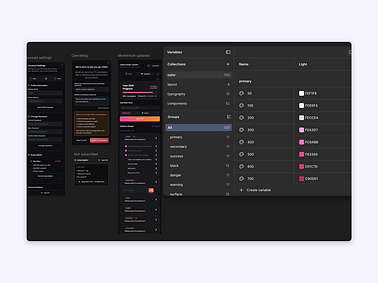
Creating a reusable component system with variables
-
Exporting styles into the CSS file
-
Building the interactive prototype in Figma Make
-
Connecting the coded version with GitHub and Supabase
The prototype is fully clickable and includes the main product interactions, account settings, dark mode, invitation states, upgrade prompts and subscription flows.
AI helped accelerate the build, but I still made the final UX and UI decisions. When the generated output introduced issues, I refined the design based on professional design judgment, usability and accessibility.

07

Designing for light and dark mode
The original design was created in light mode, but I later decided to introduce dark mode after realising that I would personally prefer to use the product that way.
Because the interface had already been built using variables and reusable components, adding dark mode was relatively straightforward.
This reinforced the value of building a flexible system from the beginning. It also gave users more choice and made the product feel more complete.
08
Testing and refinement
I tested the prototype throughout the build and shared it with a QA testing engineer for additional feedback.
The review helped identify areas where the experience could be improved, including the wording and timing of error messages and upgrade prompts.
Accessibility and mobile usability were considered throughout the process, including readable type sizes, clear hierarchy, comfortable spacing, tap-friendly controls and legibility in both light and dark modes.

09
The result
Momentum became a fully interactive mobile product prototype with a complete core journey.
The final experience includes:
-
Goal creation and completion
-
Categories and subgoals
-
Shared Goal Buddy tabs
-
Invitation flows
-
Progress tracking
-
Account settings
-
Subscription plans
-
Contextual upgrade prompts
-
Light and dark modes
-
A reusable component system
-
Fully clickable interactions
The project gave me the opportunity to design and build a product from the ground up, experiment with AI-assisted workflows and develop a stronger understanding of how design decisions connect with coded implementation.
Try the Momentum prototype
Momentum is a goal-setting app designed to help couples choose, plan and complete meaningful goals together. Explore the working prototype below to see the onboarding, goal creation and progress experience.
Turning the app into a date-night experience
Momentum is designed around a simple idea: setting goals together should feel meaningful, not like another admin task.
Alongside the app, I designed and built a supporting website that introduces the Momentum Date Night. It encourages couples to set aside time to talk about what they want from the year ahead, create shared goals and turn those ideas into a plan they can keep coming back to.
The website helps explain the concept, guide the experience and give the product a clearer identity beyond the app itself.